 Buy
Buy Rent
Rent Sell
Sell New
New Prices






Your brand, never off-brand again.
Canvas is a full design studio inside the platform — designs, folders, sharing and templates, an AI image toolkit, and a Brand Kit that applies your logo and colours to everything the moment you open it. One studio for every piece of collateral your branch produces.
How Canvas works
Six steps from blank canvas to branded output.
The same editor whether you're posting to Instagram this afternoon or briefing a full print run — a real canvas, not a form with a preview.
Start from one of a whole library of templates
A library of ready-made, on-brand templates for every job — Just Listed, Open House, Price Reduced, Sold, testimonials, market updates and more — each opening straight into the editor, already laid out. Choose from Social media, Display ads, Print, Documents, Presentations, Video or a completely Custom size. The social library alone covers Instagram (post, 4:5 post, story, reel and two ad formats), TikTok, Facebook (post, cover, story, ad, event cover and video), YouTube, LinkedIn and Pinterest — or open Letter or Flyer at true A4/A5 print size.
Your brand, already on the page
Your branch's display name, logo and brand colour are resolved server-side the instant a template loads — no colour picker, no hunting for the logo file. Set your full Brand Kit once and every design opens speaking it.
Your live listings drop straight in
You don't upload a thing. Your branch's own live listing photos are right there in the editor — pick a listing and its photography, price, address and key details flow into the template's slots automatically. Templates, Elements, Text, Uploads, AI Tools and Brand Kit live in a left-hand rail; a Layers panel and Properties panel sit on the right. Below, see how a listing looks in a Canvas template.
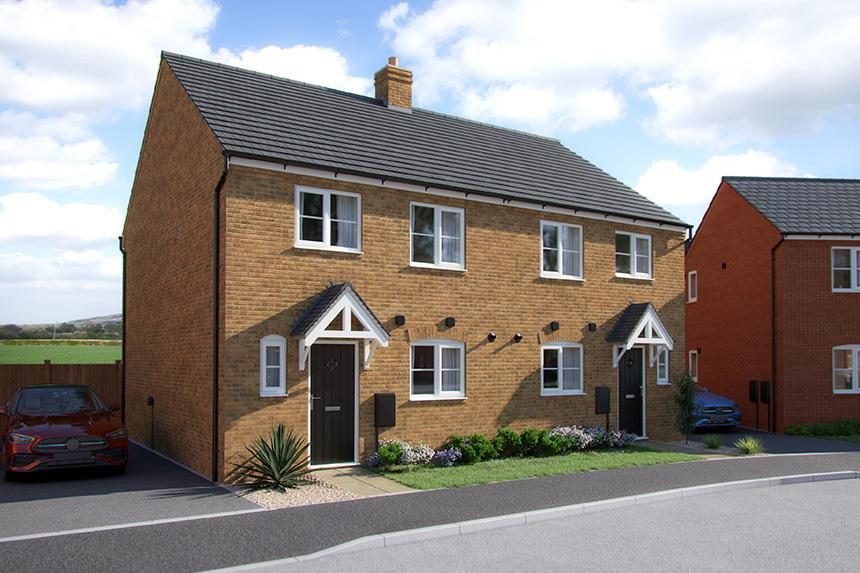
£285,000
Plot 169, The Eveleigh at Priors Hall Park, Corby, Burdock Street NN17
3 bedrooms
A recent live listing on home.co.uk · One listing, refreshed daily.
Reach for the AI image tools
Background removal, Magic Layers, upscale, enhance, relight and expand all sit on the same floating toolbar for a selected image — no separate app, no export-and-reimport. Each operation is metered against your account's monthly free AI Studio credits.
Save, star, file it away
Canvas autosaves your working state and refreshes the library thumbnail continuously in the background as a draft. Hit Save for the finished version — that's the point the branded, print-ready PDF actually renders. Star a design to pin it, or drag it into a folder to keep the library tidy.
Share, template it, or send to print
Open the Share sheet to toggle members-only or anyone-with-the-link access, complete with a QR code for sending straight to a phone. Save As Template turns a finished design into a reusable company asset. Or hand it to Print Shop for physical print, or a Campaigns send for print-and-post.
Set it once
One Brand Kit. Every template, on-brand.
The Brand Kit is hydrated server-side the moment the editor opens — no round trip, no "loading your brand" spinner. Change a colour once and it's live everywhere Canvas is opened next, for every negotiator on the account.
£285,000
Plot 169, The Eveleigh at Priors Hall Park, Corby, Burdock Street NN17
3 bedrooms
£285,000
Plot 169, The Eveleigh at Priors Hall Park, Corby, Burdock Street NN17
3 bedrooms
£285,000
Plot 169, The Eveleigh at Priors Hall Park, Corby, Burdock Street NN17
3 bedrooms
A recent live listing on home.co.uk · One listing, refreshed daily.
Palette
Up to 24 named colour roles — Primary, Accent, Text and however else your branch wants to define its palette — held against one Brand Kit and applied everywhere.
Fonts
Title, heading and body slots — pick from the studio's library or upload your own font file (WOFF2, WOFF, TTF or OTF) if your branch runs a licensed typeface.
Voice
A written brand voice you can draft with AI and then edit by hand — the same voice that feeds the copy assistants across the win-instructions tools, kept in one place.
Assets
A logo and brand-asset library, uploaded once, available from the same rail as every other tool in the editor — never a "where's the good logo file" hunt again.
The AI Studio
Six AI tools. One floating toolbar.
Select any image on the canvas and the AI toolbar appears next to it. Each operation is metered against a monthly allowance of free AI Studio credits, then drawn from your account wallet — the editor itself never stops working.

None of this needs a second app. A phone photo of an empty room can be virtually staged, a cluttered kitchen tidied, a flat sky relit into golden hour — all without leaving the design you're building, and all preserving the real structure of the property rather than inventing one.
- Structure preserved, never invented. Enhance, declutter, repaint and relight only ever touch the real photo — walls, layout and fixtures stay exactly where they are.
- Virtual staging is labelled, and empty-room only. The furniture Canvas adds is tasteful and realistic — and the tool is meant for genuinely empty rooms, not a re-dress of an occupied one.
- Comes back on the same canvas. Every AI result lands back on the layer you started from — resize, restack or undo it exactly like any other element.
Background removal
One click cuts a clean subject out of its background — a house exterior, a headshot, a for-sale board photo — ready to drop onto any coloured layer.
Magic Layers
Splits an image into a movable subject and an AI-inpainted background plate, so nudging the subject never leaves a hole behind it. The lighter version of Canva's Magic Layers.
Upscale
The Magnific engine, type-aware: photos upscale faithfully at 2x or 4x, while graphics and illustrations get a creative pass that invents crisp detail rather than just stretching pixels.
Enhance
One prompt, six modes: exposure and clarity fix, declutter, repaint the walls neutral, virtually stage an empty room, a free-text custom edit, or erase a described object entirely.
Relight
Change the mood — golden hour, overcast, a warmer interior glow — while the scene, furniture and layout stay exactly as photographed. Lighting only, structure untouched.
Expand
Grows a photo outward on any side, optionally guided by a prompt — so a tall portrait shot can fill a wide banner without cropping the subject out of frame.
Before Canvas
One branch, five different pinks.
Brand drift happens quietly — a slightly-off logo here, a Canva free-tier font there, a window card someone knocked up in Word. Canvas closes the gap between what your brand guidelines say and what actually goes out the door.
Scattered free tools
A different "brand pink" in every export because nobody's working from the same swatch, a logo pulled from an old email, and a font that isn't actually yours. Nothing matches by the time it's printed or posted.
One Brand Kit, one studio
Every negotiator opens the same Brand Kit, the same logo file, the same palette. A social post, a window card and a letter made an hour apart, by three different people, still match exactly.
From brief to every channel
Design it once. It shows up everywhere, matching.
A design isn't a personal file — it's a shared asset from the moment it's saved.

1 · Design
Build it in the editor
Pick a format, let the Brand Kit fill in the logo and colours, run a photo through the AI toolbar. Save when it looks right.

2 · Review
Comment, share, sign off
Anyone on the account can open it from the shared library, leave a comment, or pull a public link and QR code to check it on a phone.
3 · Ship
Out into the world, matching
A branded print PDF to Print Shop, a saved template for the next negotiator, or a social export — all from the exact same file.
Every format, one editor
Whatever the channel, it opens the same way.
Six categories cover the collateral a branch actually produces — plus a library of documents, presentations and video formats, and a fully custom size for anything the presets don't cover.

Social media
- Instagram: post, 4:5 post, story, reel, ad, story ad
- Facebook: post, cover, story, ad, event cover, video
- YouTube, LinkedIn, Pinterest, TikTok, Twitter/X
Display ads
- Leaderboard 728×90
- Medium rectangle, large rectangle, skyscraper
- Mobile banner 320×100
- Letter A4 / A5, true print size
- Flyer A4 / A5, true print size
- Bleed and safe-zone guides built in
Documents
A broader catalogue of preset document sizes for anything that isn't a social post or a print piece — briefing sheets, one-pagers and more.
Presentations & video
Preset slide and video canvas sizes for pitch decks and short clips, sitting in the same format picker as everything else.
Custom
Type in a pixel width and height and get a blank canvas at exactly that size — for the one format none of the presets happen to cover.
A studio, not a personal folder
Everything you make is your branch's, from the start.
Folders that organise themselves
Create, rename and delete folders freely — deleting one only unfiles its designs back into Recents, it never deletes the work. Each folder shows a live design count and a cover thumbnail automatically picked from the most recently edited design inside it.
Uploads, Listings and Stock
Alongside your own folders, three system libraries sit at the root: your persistent Uploads library, your branch's own live Listings photography, and a Stock library — so you're never starting an image search from scratch.
Star, comment, collaborate
Star a design to pin it near the top of the library. Leave a comment for a teammate directly on the design. Every design shows stacked avatars for everyone who's edited it, creator first.
Share your way
Members-only keeps a design inside your company account; anyone-with-the-link makes it a public URL with a visit counter. Either way, a QR code sends it to a phone in one scan.
Save As Template
Turn a finished design into a reusable company Brand Template with one action — a separate copy that sits in the shared template rail, so your working file stays untouched.
One company, one library
Designs belong to the company, not the person who made them. A multi-branch group keeps one consistent library its whole team can draw from, not eight separate personal stashes.
A day in the life
A new instruction, matching everywhere by lunch.
How a branch marketer turns one fresh listing into a full set of on-brand collateral, without opening a second app.
A new instruction lands
Fresh listing photography is in. It needs a window card, an Instagram post and a "just listed" letter, all matching, by lunchtime.
Open the "Just Listed" template
The branch logo and brand colour are already on the page. The exterior photo comes straight from the branch's own live listings, no upload needed.
Relight the exterior shot
The photo was taken on an overcast morning. One AI relight pass and the sky reads golden hour — the house itself untouched.
Resize into the social and print versions
Same design, resized to Instagram post, A5 window card and A5 letter — colours and logo already carried across, nothing to reapply.
from photo to three matching pieces
She saves all three. The letter is picked up straight into a Campaigns send, the window card into a Print Shop order, and the social post is scheduled from the same library — no re-export, no colour drift.
Who uses Canvas
Built for whoever's job it is to make the branch look sharp.
Negotiators & listers
Turn a fresh instruction into a social post, a window card or a letter in one sitting, on-brand automatically, without waiting on a marketing team.
Branch marketers
Set up the Brand Kit once, build the core template library, and let every negotiator reuse a properly designed starting point instead of improvising.
Multi-branch groups
One Brand Kit, one design library shared across every branch under the account — a group with several offices keeps a single consistent look, not eight.
Illustrative, not a promise
A matching set, the honest way.
Rough, illustrative figures for building one matching set of collateral from a single listing photo — your own speed will vary with how fussy you are about the layout.
How it compares
Canvas vs the alternatives.
| Capability | Canvas | No design tool |
|---|---|---|
| Brand colour, logo & fonts applied automatically | Yes | No |
| AI background removal, upscale, relight & expand | Built in | No |
| True print-size canvas with bleed/safe guides | Yes | No |
| Live listing photos in the photo panel | Yes | No |
| Company-wide library, not a personal account | Yes | No |
| Straight into Print Shop & Campaigns | One click | Manual |
| Every branch matches, every time | By default | Rarely |
Part of the toolkit
Canvas is the studio behind several other tools.
It's not a standalone app bolted on the side — the same editor and Brand Kit power a handful of tools with their own front doors.
Letter Designer
The letter-focused front door into Canvas — 16 brand-true canvassing creatives, an AI copy assistant and the same AI image toolkit, on the way to a Campaigns send.
Print Shop
Takes any Canvas design to physical print beyond letters — boards, window cards and other branch collateral, checked out from the same studio.
Social Studio
Builds a week of on-brand social assets, and can hand a split subject-and-background image straight into a fresh Canvas design to keep editing.
Photo Studio
The dedicated listing-photography workspace — the same enhance, declutter, repaint and staging engine that powers Canvas's AI toolbar, run across a whole shoot at once.
Canvassing Campaigns
Picks up a saved Canvas letter design, builds the scored cohort of homeowners to send it to, and handles the print run, cadence and tracking.
Ads Manager
Runs the display-ad creative you build in Canvas across the home.co.uk network, with impression estimates and transparent billing.
FAQ
Common questions about Canvas
What exactly is Canvas?
Canvas is the design studio built into your home.co.uk agent account — a Canva-class canvas editor for social posts, ads, letters, flyers and custom collateral, with a Brand Kit that applies your logo and colours automatically, AI image tools on the floating toolbar, and a company-wide library to save and share what you make.
Do I need design experience to use it?
No. Start from a preset format or a starter template and the layout, spacing and brand colours are already handled — you're editing text and swapping photos rather than building a layout from nothing. The AI image tools do most of the technical photo work that would otherwise need editing software.
What can I actually design in Canvas?
Social media posts and stories for Instagram, TikTok, Facebook, YouTube, LinkedIn, Pinterest and Twitter/X, display ad sizes, letters and flyers at true A4/A5 print size, plus documents, presentations, video and any completely custom pixel size. Every format opens in the same editor with your Brand Kit already applied.
Do I have to reapply my logo and colours every time?
No. Your branch's display name, logo and brand colour are resolved the moment the editor opens and dropped into the template's placeholders automatically. Set your full Brand Kit once — palette, fonts, brand voice, logo assets — and every design you or a teammate opens afterwards starts already on-brand.
What do the AI image tools do, and do they cost extra?
Six tools live on the floating toolbar for a selected image: background removal, Magic Layers, upscale, enhance (with declutter, repaint, virtual staging, custom edit and erase modes), relight and expand. Each AI Studio operation is metered against a monthly allowance of free credits; once that's used, further operations draw from your wallet or need an upgrade — there's no separate subscription just to open Canvas.
What is Magic Layers?
Magic Layers splits a photo into two independently editable layers — the matted subject and a clean, AI-inpainted background plate. The design looks unchanged until you grab the subject and move it, at which point the background behind it is already filled in rather than leaving a hole. It's a lighter version of the same idea behind Canva's Magic Layers.
Can the rest of my branch see and reuse designs I've made?
Yes. Designs belong to your company, not just the person who made them, so any branch under the same account can reopen a saved design from the library. Each design also shows stacked avatars for everyone who has edited it, so it's clear who's been in there.
Can I make templates the whole team reuses?
Yes. Any finished design can be saved as a company Brand Template — a separate copy in a shared template rail that anyone on the account can open and adapt, without touching your original working file.
Is there a limit on designs or folders?
There's no fixed cap surfaced in the product on how many designs or folders you can create. Organise your library with as many folders as you need — each shows a live design count and an automatically picked cover thumbnail from the most recently edited design inside it.
Can I print what I design in Canvas?
Yes. Letter and flyer formats are built at true A4 or A5 print geometry with bleed and safe-zone guides, and saving renders a branded, print-ready PDF. From there a design can go straight to Print Shop for physical print, or into a Campaigns send for print-and-post.
Does Canvas work with Letter Designer and Social Studio?
Yes — they share the same editor, Brand Kit and design library. Letter Designer is the letter-focused entry point into Canvas; Social Studio can hand a split subject-and-background image straight into a fresh Canvas design via its "Alter in Canvas" action.
Can Canvas pull in my live listing photos automatically?
Yes. The editor can surface your branch's own live listing photos directly in the photo panel, and templates with photo slots can be pre-filled from your newest listings with photography. Ten mail-merge fields — property type, bedrooms, postcode, estimated value and more — are also available to drop into any text box, each with a safe fallback.
What happens if I run out of free AI Studio credits?
Every AI Studio operation — background removal, Magic Layers, upscale, enhance, relight, expand — draws against a monthly allowance of free credits. Once that's used up, further operations are covered from your account wallet or need an upgrade; the rest of Canvas, including the design editor itself, keeps working either way.
Is my design work private, or can other people see it via a link?
You choose. The Share sheet toggles between members-only (anyone signed in on your company account) and anyone-with-the-link (a public URL, with a visit counter and a QR code for sending to a phone). Nothing is public by default.
Does autosave mean I can lose my print-ready PDF?
No. Canvas autosaves your canvas state and a preview thumbnail continuously in the background as a draft, but the branded, print-ready PDF only renders when you hit Save. That keeps the heavy render off every keystroke while making sure your working state is never lost.
Canvas is part of the estate-agent toolkit used across 10,616 UK agent branches on home.co.uk.
More tools
Explore the rest of the estate agent toolkit

Patch
See who is likely to move before anyone else
A live map of your territory scored for likelihood to move — reductions, withdrawals, fall-throughs, stale stock and landlord stock, each with a full property dossier.

Property Reveal
Unmask the owner behind any likely mover
Pay-per-address owner reveal on hot properties — single or bulk — so your canvassing letter lands with a name on it, not "Dear Homeowner".

Canvassing Campaigns
Direct mail that lands when it matters
Branded letters to scored cohorts in your patch — printed, posted and tracked for you, with cadence sequences and auto-canvass rules that enrol newly-hot homes.

Letter Designer
Design the letter they keep
A full letter design editor with AI copy assistance and AI-generated artwork — every mailing in your brand, saved as templates your whole branch can reuse.

CRM Match
Which homes in your database are on the market
Upload a CSV from your CRM and see what has happened to each home since: its last sale, whether it has changed hands, its value and rent, and whether it's on the market now and with whom. From 10p per record + VAT, with a free 100-record sample.

AI Market Appraisal
Walk in with the valuation already done
AI valuation with comparables and an AI council that stress-tests the number — appraisal-ready before you reach the doorstep.

Valuation Leads
Homeowners asking to be valued
Inbound valuation requests from home.co.uk delivered to your branch — statuses, auto-accept, delivery rules and per-lead intelligence in one inbox.

My Market
Your market share, measured honestly
Branch-level market intelligence — share of new instructions, competitor branch ranking, demand and stock trends across your outcodes.

Scoreboard
Every letter traced to its instruction
Outreach-to-outcome attribution — which campaigns, reveals and canvass rules actually turned into valuations and instructions, and what they cost you.

Photo Studio
Every listing photo, magazine-grade
AI photo enhancement, virtual staging and automatic room sorting — phone shots in, listing photography out.

Social Studio
A week of social in one sitting
AI social assets in your brand — Instagram analysis, market-stat templates and ready-to-post creative for every listing and win.

The Home feed
Post once, be seen by local movers
A free, Instagram-style feed on home.co.uk: photos, carousels and reels, new listings that post themselves, and a branch profile that gathers followers.

Your agency profile
The page sellers land on
Your free public page on home.co.uk: your homes, the badges you have earned, your Home feed posts and a free valuation button, with optional extras you add by the month.

Articles
Your local content engine
An AI article pipeline from idea to published — keyword research, outlines, drafts, freshness updates and batch series that make you the local authority.
Website Studio
A new agency website by Friday
White-label, AI-assisted agency websites with custom domains — designed, built and hosted on the platform, synced to your brand kit and stock.
Widgets
Your site, powered by portal data
Embeddable valuation and property widgets for your own website, with analytics on every visitor interaction.

Ads Manager
Local advertising, self-serve
Banner campaigns across the home.co.uk network — targeting, impression estimates, creative tools and transparent billing, run from your dashboard.
Print Shop
From design to doormat
Print your Canvas designs as physical collateral — catalogue pricing, checkout and delivery handled from the same studio you designed in.

AI Visibility
Be the answer AI gives
See how your agency shows up across AI engines — visibility checks, brand mentions, tracked prompts and traffic correlation with your Google Analytics.
Listings Manager
Your stock, one command centre
Create, edit and publish listings with full media management, version history and imports — plus outbound feeds to the major portals.

CRM Sync
Plugs into the CRM you already run
Listing sync with Apex27, Alto, Jupix, Street, Rex, Loop, Domus, Expert Agent and more — stock flows in automatically, no re-keying.

Performance Analytics
Know which photo sells the house
Per-listing analytics — photo performance, price health and live view counts across your whole stock.

AML Checks
Compliance that bills the client
Anti-money-laundering identity checks with certificates stored against the deal — and bill-the-client payment so compliance stops costing you money.

Proof of Ownership
Title checked before you list
HM Land Registry titles bought in-platform via Business Gateway — pay-as-you-go or billed to the client, stored against the property.

Material Information
Part A, B and C without the chase
Material-information disclosure packs per property, with seller invites that collect the answers for you.

HomeSign
Signed before the seller cools off
E-signatures built in — send terms of business, track them from sent to signed, and keep every signed document stored against the lead it belongs to.

Referrals
Revenue from every completion
Referrals across eight services — conveyancing, mortgages, removals, surveys and more — with milestone tracking and payouts on business you already have.

Inigo
The AI assistant that knows your patch
Ask questions over your own market, patch and stock data — streamed, grounded answers inside the platform.
One platform for the branch. Every tool included.
Join home.co.uk and get the estate-agent toolkit with your account: market intelligence, canvassing, design studio, AML and ID checks and listings tools in one place. No lock-in. Pay only for the premium tools you actually use.
Quick setup · Built for UK estate agents · Trusted UK property platform since 1995