 Buy
Buy Rent
Rent Sell
Sell New
New Prices






The RICS Level 2 template, alive in your browser.
Write a RICS Home Survey Level 2 the way you actually think — element by element, rating by rating — with the structure validated for you, AI suggestions on every field, comparables baked in, and a branded PDF one click away. Craft plus control: you hold the pen; the editor holds the standard.
How the editor works
Five moves from front gate to signed PDF.
No blank page, no Word template, no separate research tab. The editor carries the RICS structure so every minute you spend goes into the survey, not the formatting.
Create the report — the data arrives first
Enter the property address and the editor resolves it to a UPRN against Land Registry and our property database. Section A pre-fills from your firm profile — name, RICS number, firm address — and Section C pre-populates with construction type, age, EPC rating, heating system and environmental risk scores. You start writing with the boring third of the report already done.
Write element by element in the structure panel
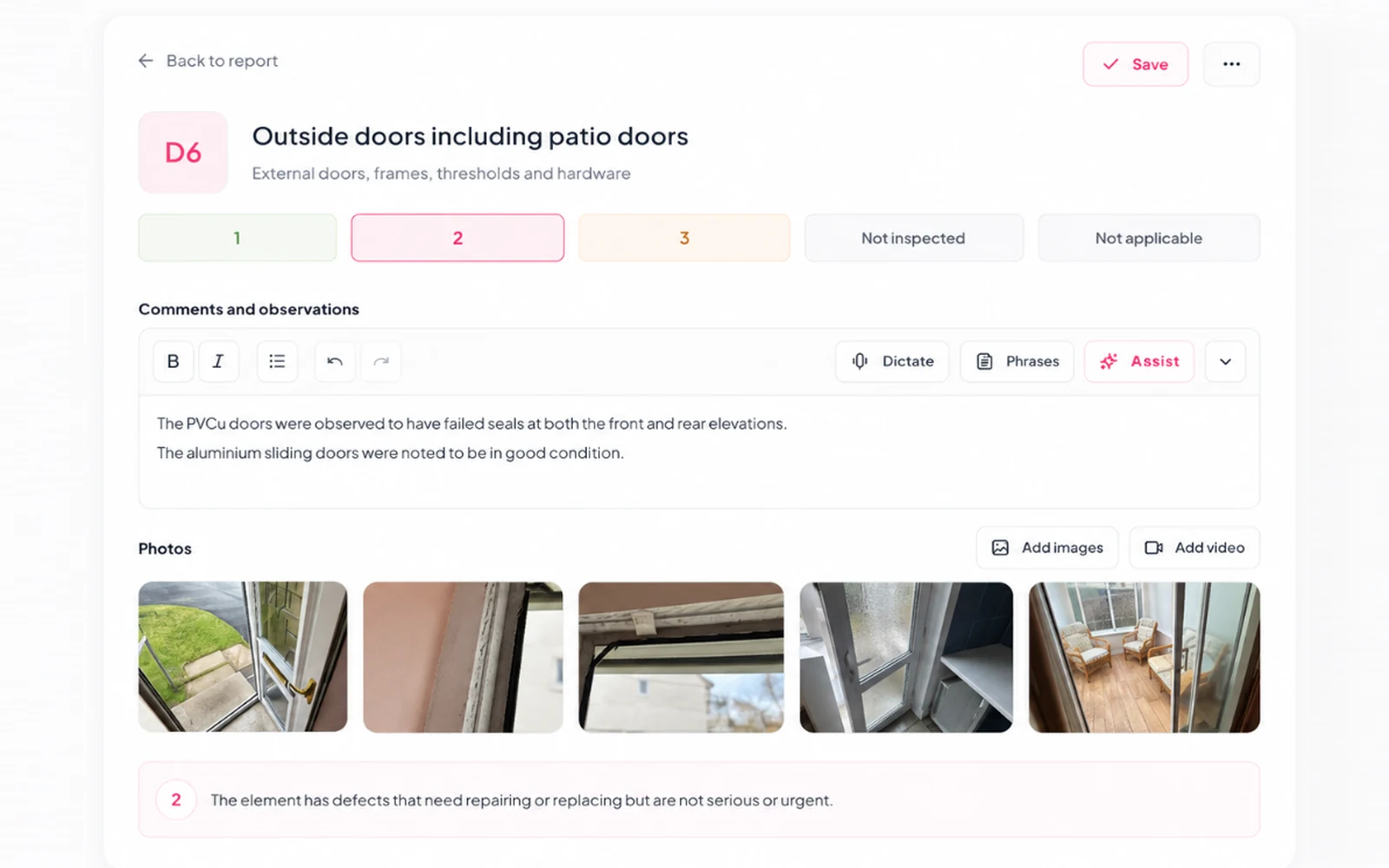
The whole report tree sits on the left — D1 Chimney Stacks through G3 The Grounds, every element code validated so nothing slips through. Open an element, add your observation, set the condition rating (1/2/3 or your firm's custom scale), attach photos straight into the element's gallery. Prefer to speak? Dictate observations on a phone with the AI Dictation tool and polish them at the desk.
Call the AI when you want it — never before
Highlight a fragment and ask for a suggestion: the AI proposes polished wording beside your cursor, aware of the element you're editing, your current rating, the photos attached and your firm's style profile. Accept, edit or reject — it never silently mutates your prose. Pre-approved wording from your Standard Phrases library drops in with one click.
Fetch comparables without leaving the report
Open the Comparables tab and pull sold prices and rental listings within a 1-mile radius from our property database — the same source behind home.co.uk's public sold-prices pages. Filter by bedrooms and property type, tick 3–10 picks, and a weighted valuation range drops into the appendix. The full workflow lives in the Comparable Sales Tool.
Check it, then ship it
Run the RICS Standards Check on any section or the whole report — it flags rated elements with no supporting narrative, a blank Section H when Rating 3 items exist, and missing declaration fields. Then one click renders the branded A4 PDF: cover page, condition summary, photo appendix, comparables, self-updating contents. Share via a secure token link or download.
The real thing
This is the actual editor, mid-write.
Not a mock-up — a live Level 2 report open at Section D, captured from the product. Structure panel on the left, observation and rating per element, photos filed where they belong.
The spine of a Level 2
Ten sections. One rail, A to J.
Every RICS Home Survey Level 2 follows the same spine. Scroll it — the rail fills as you go, and each section says what belongs there and who writes it: you, the AI, or the data.
About the inspection
Auto-filled · From your firm profileInspector details, RICS number, inspection date, weather, access notes and accommodation summary.
Overall opinion & summary
You + AI · Your judgement, AI draftsThe overall opinion paragraph, priority items and condition summary — the hardest page to start from blank. Otto can synthesise a skeleton from your D–G findings.
About the property
Auto-filled · From EPC, UPRN & risk dataConstruction, age, walls, roof, heating, floors, location and environmental risks.
Outside the property · D1–D9
You + AI · You observe, AI polishesChimney stacks, roof coverings, rainwater goods, main walls, windows, doors, conservatories. Comments + rating + photos per element.
Inside the property · E1–E9
You + AI · You observe, AI polishesRoof structure, ceilings, walls, floors, fireplaces, fittings, woodwork, bathrooms. Element-by-element narrative.
Services · F1–F7
You + AI · You observe, AI polishesElectricity, gas, water, heating, hot water, drainage. EICR and boiler-service notes where evident.
Grounds · G1–G3
You + AI · You observe, AI polishesGarage, outbuildings and the grounds — boundaries, retaining walls, paving.
Issues for legal advisers
You write · Your call, checkedRegulations, guarantees and other matters your client's conveyancer needs to see. Manual in Level 2 — flagged by the standards check if left blank with Rating 3s present.
Risks
You + AI · Data-driven, you approveRisks to the building, grounds and people, plus energy and sustainability — driven from EPC and image findings, finished by you.
Surveyor declaration
You sign · Name, number, signatureSignatory line, RICS number, firm address and regulatory disclosure. The report is yours — this is where you make it official.
Signed at J — and the PDF is one click away.
+ Comparable sales appendix
3–10 sold and rental comps within 1 mile, weighted valuation range. Via the Comparable Tool.
+ Photo appendix
Top 25–50 images ranked by relevance and quality by the Image AI, captioned by element.
+ Environmental appendix
Flood, subsidence and radon summary for the subject property via the Environmental Report.
The writing day, redrawn
Keep the craft. Lose the drudgery.
The judgement stays yours — what's a 2, what's a 3, what the buyer needs to hear. What goes: the retyping, the reformatting, the late-night table of contents.

1 · The review
Read it like a client would
The editable web report reads like the finished document, because it is the finished document. No preview tab, no surprise layout shifts at export.

2 · The retirement
Retire the red pen
Markup happens in place: highlight, rewrite, accept. The standards check does the read-through against the RICS standard, and every change lands in the version history.

3 · The delivery
Same-day handover
For a straightforward property, first key to client delivery in 1–2 hours with the full toolkit. Secure share link or PDF — the buyer gets it while the inspection is still fresh.
The editor, up close
Every field is a workbench.
Two details that make the difference at 9pm on a writing day: an AI that proposes without overwriting, and a photo drawer that files itself.
The main roof is covered in natural slate laid in regular courses. Several slipped slates were noted to the front elevation near the eaves. Flashings to the chimney base are weathered.
Isolated slipped slates to the front eaves should be re-fixed; budget for localised repairs.
The element field, fully armed
Observation, rating and photos live together on each element. Highlight a sentence for an AI suggestion — context-aware of the element, your rating, the attached photos and your firm's voice — or run the standards check on the field before moving on. Accept, edit or reject; your prose is never silently changed.
A photo drawer that files itself
Drag images between D1–G3, mark the front elevation, caption per element and bulk-reassign with section dropdowns. At export, the Image AI ranks the set and pulls the top 25–50 into the photo appendix in element order — you can override any pick.
The other half of the story
Otto writes the first draft. This editor finishes it.
Otto is the auto-mode engine: dictate on site, upload photos, and it routes every sentence into this same Level 2 structure in 5–15 minutes. Then you open the report here — same data, no import step — to review, refine and sign. Most surveyors run the hybrid: Otto for the bulk, this editor for the craft.
You dictate the walk
One recording, up to 200 photos. No order required.
Otto routes every sentence
To the correct RICS field, with a 0–1 confidence score each.
You finish it here
Review low-confidence fields, polish Section B, fetch comps, sign.
Same report, two ways in. Switch between Otto and the editor at any point — nothing to export, nothing to re-key.
Pick your workflow
The writer alone, or the writer plus Otto.
Both beat a Word template. Together they close the gap between inspection and delivery to the same morning.
| Stage | Editor alone | Editor + Otto |
|---|---|---|
| First draft of D–G elements | You type or dictate per element, AI suggestions on demand | Routed automatically from one site dictation |
| Section A & C pre-fill | Automatic — firm profile, UPRN, EPC | Automatic — same data layer |
| Section B overall opinion | You write it, with AI polish and standard phrases | Skeleton synthesised from D–G findings, you refine |
| Photo filing | Drag-and-drop into element galleries | Auto-categorised to element codes, best ~35 selected |
| Comparables & appendices | Fetched in-report, 1-mile radius | Same — fetched in-report |
| Standards check & PDF | Built in, one-click branded export | Built in, one-click branded export |
| Typical desk time per Level 2 | 15–45 min of writing with the toolkit | 5–15 min Otto run + your review |
Old habits welcome too: the same editor also beats the Word template on validation, contents, comparables, photo appendix, version history and export — see the FAQ for the full breakdown.
Comparable sales
Sold & rental comps,
without leaving the report.
Open the Comparables tab, hit Fetch, and the system queries our property database for similar sold properties and rental listings within a 1-mile radius. Filter by bedrooms and property type. Tick 3–10 to include. The system calculates a weighted valuation range adjusted for assessed bedrooms, floor area, age and condition — and the data is preserved in the report, dated and sourced, as evidence behind your opinion of value.
Read about the dedicated Comparable ToolInside the PDF
A client-ready report. Not a draft.
One click renders the print-ready A4 PDF — everything a client expects from a RICS Level 2, in your firm's branding, the same day as the inspection.
Branded cover page
Your firm logo, firm address, property address, inspection date and a cover photograph — generated automatically from your firm profile.
Executive summary
Overall opinion paragraph and a plain-language priority items list at the front of the report, written by you and polished with the AI if needed.
Condition ratings overview
A full traffic-light grid across all rated elements — D1 through G3 — so the client sees the whole picture before reading the detail.
Sections A–J in full
Every section of the RICS Home Survey Level 2 standard: inspection details, element narratives, condition ratings, legal adviser notes and surveyor declaration.
Comparable sales appendix
Your selected 3–10 sold and rental comparables from our property database, with the weighted valuation range you have chosen to include.
Photo appendix
Top 25–50 inspection photographs, automatically ranked and captioned by element. Configurable per report or firm-wide.
Self-updating contents
Page numbers accurate to the final layout. Sections skipped during authoring are removed automatically — no blank entries pointing to nothing.
Secure share link
Clients view the report online via a secure token-based link — or download the PDF directly. No login required on their side.
Firm branding throughout
Header, footer, cover page and colour scheme come from your firm profile. Every page carries your identity, not a generic template.
Professional protection
Version history baked in.
Your PI position is solid.
RICS Level 2 reports carry real professional liability. Every save — automatic or manual — creates a timestamped snapshot of the full report, capturing the exact section data and completion percentage at that moment. Up to 50 snapshots are stored per report.
If a client dispute arises months after delivery, you can retrieve the exact state of the report at any point during authoring — not just the delivered PDF — and demonstrate what was recorded, what changed, and when. The snapshot history also lets you restore to any earlier version if a batch of revisions took the report in the wrong direction.
The comparable sales appendix adds a further layer of evidence: the sold and rental data supporting your valuation opinion is preserved within the report, dated and sourced from our property database.
See the RICS standards checkAutomatic snapshots while you write
Every auto-save and every deliberate manual save generates a new timestamped version capturing the full section data and whether the save was automatic or intentional.
Up to 50 versions per report
The snapshot history spans the entire authoring session — from first save through to the moment the PDF was generated. Browse or restore any earlier version at any time.
Share link timestamp
The secure client share link records the moment it was first generated, providing an evidence record alongside the PDF itself. Clients access the report via a token-based link — no account required on their side.
APC candidates
Competency evidence, as a by-product
The structured A–J sections, standards-check feedback and a logged trail of accepted AI suggestions give APC candidates an auditable record of how each HomeBuyer Report met the RICS Home Survey Standard — and of how AI assistance was reviewed rather than relied upon.
Who uses it
Built for residential surveyors. Scaled to any practice.
From sole practitioners writing two HomeBuyer Reports a day to multi-branch firms standardising output across a team. One part of the full surveyor toolkit — and one listing on the surveyor directory.

The writing hour, protected.
Whatever your volume, the editor keeps it to an hour — not an evening.
Sole practitioners
No admin, no typist — pre-filled Section A, AI suggestions per field and one-click PDF mean same-day turnaround without the late evenings reformatting a document.
Multi-branch firms
When ten surveyors write ten styles, QA takes as long as the writing. The Style Profile and standards check bring one voice and one structure to every report that leaves the office.
High-volume practices
At 50+ Level 2s a month the saving compounds: 45–90 minutes per report versus a Word workflow, more when Otto writes the first draft.
Surveyors growing into Level 2 work
Validated element codes and a standards check that catches incomplete sections reduce the risk on early instructions — and the comparables appendix is a ready-made support for your first valuation opinions.
Why surveyors choose it
Ten things a Word template will never do.
Element codes validated automatically
D1 through G3 are first-class data, not headings in a document. A missing element cannot slip through, and the structure panel always reflects the RICS Home Survey Standard for Level 2.
UPRN and EPC data pre-loaded
Enter the address and Section C auto-populates: construction type, floor area, EPC rating, heating system and environmental risk scores from our property database. No second browser tab.
Context-aware AI suggestions
The AI knows which element you are editing, your current rating, the attached photos and the property details — so its proposed wording is survey-specific, not generic. Accept, edit or reject.
Photo intelligence built in
Photos are analysed, ranked and captioned by element; the top 25–50 flow into the photo appendix in element order. The same engine as the standalone Image AI tool.
A contents page that maintains itself
Page numbers regenerate as you write; skipped sections drop out automatically. No orphan "Section H" entries pointing at nothing.
Standards compliance before delivery
The RICS standards check flags unrated narratives, a blank Section H against Rating 3 items, and missing declaration fields — before the client sees any of it.
One firm voice across every writer
Your firm's preferred terminology is applied on every AI suggestion via the Style Profile — or trained directly from past reports with AI Training.
Leasehold and conversion-aware
Flat inspections adapt automatically: D2 roof elements appear only with access, G1–G3 covers communal grounds, and tenure details live in Section C with lease notes in Section H.
Full undo/redo and 50 snapshots
Transactional history across the editor plus a timestamped snapshot on every save — restore any earlier version, or evidence exactly what the report said at any moment.
Any device, one login
Browser-based on phone, tablet and desktop. Start on-site, finish at the desk; reports persist server-side with firm-level team permissions.
Working a new-build? The Snagging Report Builder lives in the same account for combined Level 2 + snagging visits. Keep the instruction pipeline moving in the Bookings CRM — the report is one stage of it.
Lever ③
Writing this report here counts towards your rate.
From 1 August 2026 four levers set your rate on both Homemove panel work and private bookings: a live diary, a pipeline running through our CRM, reports written on our tech, and fast turnarounds. Writing a Level 2 in this editor — or letting Otto populate it from your dictation — is lever ③. See the full maths on the rate ladder on the Join page.
There's no separate subscription for the editor or for Otto — both are pay-as-you-go, metered only when you generate or export a report. Keep the pipeline this report belongs to moving in the Bookings CRM, and once it's delivered, track your own turnaround — lever ④ — in Performance.
Getting started
Your first Level 2 report, ready to deliver.
No configuration required. Claim your firm, create a report, write it, check it, ship it — all inside one browser window.
Claim your firm
Search for your firm by name or postcode — most RICS-regulated firms are already listed, so you just claim yours. The editor activates once your RICS membership is verified.
Create the report
Start a new Level 2 and enter the property address — UPRN data and EPC details load automatically, and Section A pre-fills from your firm profile.
Write and check
Work the structure panel element by element with AI suggestions on demand. Fetch comparables in the Comparables tab, then run the RICS standards check.
Generate and deliver
Click Generate PDF. Your branded A4 report — cover page, condition summary, photo appendix, comparables — renders immediately. Share via secure link or download.
FAQ
Common questions about the Level 2 Report Writer
Level 2 basics
What is a RICS Level 2 Home Survey?
The RICS Home Survey Level 2 (formerly the HomeBuyer Report) is a mid-level home survey aimed at conventional, well-maintained properties. It uses traffic-light condition ratings (1=Good, 2=Maintenance, 3=Serious Defects) across the building's external, internal, services and grounds elements, and includes legal/adviser notes. It sits between a Level 1 (condition report) and a Level 3 (full Building Survey).
What is the difference between a RICS Level 2 and a Level 3 home survey?
The RICS Home Survey Level 2 (formerly the HomeBuyer Report) uses a standardised element structure with traffic-light condition ratings 1/2/3 across Sections A–J. It is suited to conventional, well-maintained properties where the surveyor does not need to report on hidden areas in detail. A Level 3 Building Survey (Sections A–O) is more detailed, includes in-depth analysis of construction, materials and defect causes, and is required for older, altered, larger or non-standard properties. The Level 2 Report Writer covers Sections A–J. For Level 3, see the dedicated Level 3 Report Writer.
Does the Level 2 report include a market valuation?
The report includes a Comparable Sales appendix with a weighted valuation range derived from sold prices and rental listings within 1 mile. The final opinion of value is authored by the surveyor — the comparable data supports that judgement rather than replacing it. You can include or exclude the comparables appendix on a report-by-report basis.
Does the Level 2 Report Writer work for non-standard or listed buildings?
Yes. Every element field accepts free-text observations, so you can describe non-standard construction in as much detail as needed. The AI suggestions adapt when you flag non-standard construction in the property details. For listed buildings, add conservation restrictions in Section H (legal adviser notes) or the relevant element narrative — the standard RICS element codes still apply.
Can I use the Level 2 Report Writer for leasehold flats and apartments?
Yes. The editor adapts to flat inspections automatically — roof covering elements (D2) only appear where the surveyor has direct access, and the Grounds section (G1–G3) covers communal areas and shared services. Section C records the tenure (leasehold, share of freehold) and you can note lease length, service charge and management company details in Section H (legal adviser notes). The Comparable Sales appendix draws on leasehold sold prices filtered by the same property type and bedroom count as the subject property. The photo gallery also supports flats with communal stairwells, shared plant rooms and roof terrace elements.
Does the Level 2 Report Writer handle properties with extensions, loft conversions or permitted development works?
Yes. Extensions and loft conversions are recorded within the relevant element sections — D8 (Conservatories and porches) for single-storey additions, or the main wall and roof elements (D1, D2, D3) for full two-storey extensions. In Section H (Legal and Adviser Issues) you can note any concerns about planning permission, building regulations sign-off or guarantees relating to the works. The AI field suggestions adapt to extension-related observations when you describe the construction type and any alterations in the property details (Section C). The RICS Standards Check will flag if a Condition Rating 3 observation on an extension is present but Section H is left entirely blank, prompting you to add the appropriate legal adviser note before delivery.
Writing with the editor & the AI
How is this different from Otto?
The Level 2 Report Writer is the manual editor — you author each section yourself with AI content suggestions on demand. Otto is the auto-mode flow built on top of the same data model: it routes a dictation transcript and photos directly into the same Level 2 report. You can switch between the two on any single report.
Can the Level 2 Report Writer auto-generate a first draft from my dictation?
Yes — this is the Otto hybrid workflow. Dictate your observations on-site using the AI Dictation tool; Otto produces a first-draft skeleton routed into the appropriate Level 2 sections. You then open the same report in the Level 2 editor to review each element, add any detail the dictation did not capture, polish the Section B summary and run the RICS standards check before generating the PDF. Every field retains its inline AI-suggestion context regardless of which mode produced the initial content.
Can I start a Level 2 report in Otto auto-mode and then finish it in the manual editor?
Yes — that is the recommended hybrid workflow. Otto populates the sections it can reach from your dictation transcript and inspection photos; you then open the same report in the Level 2 editor to review each element, add observations Otto could not infer, polish the Section B summary, run the RICS standards check, and fetch comparable sales before generating the PDF. Every element retains its full inline AI-suggestion context regardless of which tool last touched it. See Otto auto-mode for the full dictation-to-report pipeline.
Can I save and reuse standard phrases in my Level 2 reports?
Yes. The Standard Phrases tool lets you build a library of pre-approved firm observations — recurring element descriptions, standard legal-adviser note wording, common risk disclosures — and insert them into any element narrative or priority item with a single click while editing the Level 2 report. Phrases are shared firm-wide, so a principal's preferred wording is available to every surveyor on the team. This is especially useful for high-frequency defect types that appear across many reports: flat-roof condition notes, damp-penetration observations, boiler service advisory notes, and so on.
Can I customise the rating scale?
Yes. If your firm uses a 5-point scale instead of the standard 1/2/3, define it in your firm settings. The AI prompts dynamically rebuild to use your terminology and the ratings dropdown updates accordingly.
Does the AI see my client's data?
The AI sees only the inspection data you enter and the photos you upload. It is not used to train provider models. All requests are made server-side from your Home.co.uk account.
Comparables, photos & output
How are comparables sourced?
Comparables come from our property database — the same source that powers home.co.uk's public sold-prices and rental-prices pages. You get sold properties and rental listings within a 1-mile radius, filtered by bedrooms and property type.
How does the photo appendix ranking work in the Level 2 report?
When you upload photos to an element, the Image AI analyses each image for clarity, relevance and defect visibility. It scores and ranks the full set, then the top 25–50 (configurable per report or firm-wide) are pulled into the photo appendix in element order — D1 through G3 — with captions matching the element code and description. You can override the selection or reorder images manually before generating the PDF.
Can I export to Word?
The default export is a branded PDF rendered from the editable web report. Word export is available as an admin-configurable output for firms that need editable .docx for client revisions.
Can I complete and deliver a HomeBuyer Report the same day as the inspection?
Yes — same-day delivery is achievable for straightforward properties. Capture observations and photos in the editor on a phone or tablet during the inspection, or dictate observations using the AI Dictation tool. Back at the desk, Section A pre-fills from your firm profile, AI suggestions eliminate the blank-page step for each element, comparable sales fetch in seconds, and the branded PDF renders in one click. Most surveyors report that a clean three-bedroom terrace takes 1–2 hours from first key to client delivery when using the full toolkit — compared with a typical half-day in a Word workflow.
How much time does the Level 2 Report Writer save compared to a Word template?
Most surveyors save 45–90 minutes per report. The main gains come from AI field suggestions (no starting from blank), auto-fetched comparable sales, a self-updating table of contents and one-click PDF export. Section A is also pre-filled from your firm profile, removing another repetitive step.
What are the main advantages of dedicated HomeBuyer Report software over a Word template?
For Level 2 reports, the structural advantages compound across every instruction. RICS element codes D1–G3 are validated automatically — no risk of a missing element slipping through. Section C pre-populates from UPRN, EPC and image data, removing a manual data-gathering step. Comparable sales fetch in seconds rather than requiring a separate browser session. The table of contents regenerates as you write and drops sections you have not used — no orphan entries to tidy. The RICS Standards Check replaces a manual read-through against the standard before delivery. The report is stored in your surveyor account and accessible between site visits and from any device, with a branded PDF generated in one click. For practices writing more than a few HomeBuyer Reports a week, the time saving per report typically exceeds 45 minutes — and it compounds across the team.
Firm, PI & professional practice
Can colleagues in my firm review or contribute to the same Level 2 report?
Yes. Reports are saved server-side and accessible to anyone in your firm with the appropriate account permissions. A colleague can open the same report to QA specific sections, run the RICS standards check or complete outstanding elements before the lead surveyor signs off. Section A pre-fills from the signing surveyor's profile, not the person who opened the report last.
Does the Level 2 Report Writer keep a version history for professional indemnity purposes?
Yes. Every save — automatic and manual — creates a timestamped snapshot of the full report, capturing the exact section content and completion percentage at that moment. Up to 50 snapshots are stored per report. If a client dispute arises after delivery, you can retrieve the exact state of the report at any point during authoring and compare it to the delivered PDF. The snapshot history also lets you restore any earlier version if a batch of revisions takes the report in the wrong direction.
What does the RICS standards check actually review in a Level 2 report?
The built-in standards check compares each section against the RICS Home Survey Standard. It flags: element fields with a Condition Rating 2 or 3 but no supporting narrative; Section H (Legal and Adviser Issues) left entirely blank when there are Rating 3 items; missing surveyor declaration fields; the absence of a recommendation to seek specialist advice where a Rating 3 is recorded; and significant inconsistencies between the property type description in Section C and the elements inspected. The check returns section-level feedback so you know exactly what to address before delivering to the client. It is a quality-assurance prompt — not a replacement for your professional judgement or formal PI requirements.
Is the Level 2 Report Writer suitable for APC candidates building competency evidence?
Yes. The RICS APC requires you to demonstrate that your HomeBuyer Report work meets the RICS Home Survey Standard. Writing reports in the Level 2 editor creates an auditable record: each section and element field is completed in a structured, standards-validated environment, and the RICS Standards Check provides section-level feedback before sign-off. The Comparable Sales appendix demonstrates that your valuation opinion is grounded in market evidence. Your account history logs every accepted AI suggestion, giving you a clear record of where AI assisted and where your professional judgement overrode it — a useful reference when an assessor asks how you use AI tools in your practice.
Can I use the Level 2 writer on a phone or tablet during the inspection?
Yes — the editor is fully browser-based and works on any modern device. Many surveyors dictate observations using the AI Dictation tool on a phone at the property, then polish the report on a desktop or laptop afterwards.
More tools
Explore the rest of the surveyor toolkit

Home Academy
Short lessons on Home tools
Learn the steps, try the real tools and follow a first-week path to your first Otto report.

Otto
AI auto-mode RICS report writer
Dictate on-site, upload photos, get a finished, fully-routed Level 2 or Level 3 report in minutes.

Level 3 Report Writer
RICS Building Survey Level 3
Comprehensive Level 3 Building Survey reports with deep technical sections, custom rating scales and AI legal-adviser notes.

Surveyor Comparable Tool
Sold + rental comps in one click
Auto-fetch sold and rental comparables within a 1-mile radius, weighted valuation range, branded PDF appendix for any survey.
Snagging Report Builder
New-build defect tracker
Build professional new-build snagging lists with location-based defect tracking, photos, urgency, status and PDF export.

Schedule of Condition
Room by room, photo by photo
A dated record of a property's condition, every elevation and every room, dictated on site with numbered photos referenced for you and a branded PDF. No ratings, no advice.

AI Dictation
Voice-to-fields routing
Speak observations on-site; AI routes every sentence to the correct RICS field with confidence scores and replayable audio.

Image AI
Auto-categorise survey photos
Upload up to 200 photos; vision AI tags each to the right RICS element, rates condition, extracts defects and picks the best 35 for the report.
Style Profile
Your firm's writing fingerprint
Teach the AI to write like your firm — upload past reports, the AI extracts a 25-dimension writing fingerprint and applies it to every future auto-mode report.

Property Viewer
Pre-survey property intelligence
Look up any UK property and instantly see EPC, energy renovation costs, broadband coverage, environmental risks (flood, radon, mining, landfill), invasive plants, sales history and listing status — all in one dashboard.

Property Data Drawer
EPC + risks + comps in one panel
Open the property data drawer in any report to see EPC, environmental risks, listing history and comparables — copy-paste ready.

Standard Phrases
Reusable language library
Personal, firm-wide and industry-preset phrase libraries — insert with one click and use to train AI routing for voice consistency.
Required photos
Every report leaves with the photos you expect
Set the photos each Level 2 and Level 3 report must contain. Surveyors see a checklist as they write, and a report can't be issued until each photo is there or the reason is written down.

RICS Standards Check
A Home Survey Standard check before you sign
One-click AI check against the RICS Home Survey Standard — flags missing content, weak ratings and structural gaps before you sign the report.

Quote Builder
Clear choices, a date to decide
Send branded survey quotes with up to three options, a PDF and an expiry date. Reuse service templates, track responses and see your win rate.

Home Payments
Paid faster, no invoicing
Home Payments mission control — customers pay at booking through a Stripe-verified checkout, payouts land on a schedule you can see, payment links cover your private work, and there is no invoice chasing ever again.

Bookings CRM
Every job, one pipeline
The surveyor CRM built into the platform — Homemove jobs land pre-paid with customer and property attached, enquiries convert to bookings, and the whole pipeline runs from one screen.

Panel work
Every panel job, every deadline
Run jobs from the other panels you work for beside your own. List each panel with its usual fee and turnaround, add a job in under a minute, and watch every report deadline count down.

Calendars & Requests
A diary that fills itself
Per-surveyor diaries with live availability — keep your dates current and we book real jobs straight in, with inbound availability requests answered in a tap.

The firm inbox that knows the job
A full mail client scoped to your firm — @home.uk purpose mailboxes and per-user addresses, with every thread landing against the booking it belongs to.

Documents & e-sign
Signed before you set foot on site
Terms of engagement sent with the booking, tracked from sent to signed, chased automatically and stored against the job — no more chasing clients to sign.

Insurance & conflict checks
Safe to take the job
Every new job is checked against your firm's own history, so you know when you have surveyed a property before. Your PI insurance is tracked with reminders, and new reports can't be issued once recorded cover has lapsed.

Telephony
The firm number that never misses a job
A phone system built into the platform — take calls in the browser, forward to mobiles, ring the whole team at once, and keep a shared call log with optional recording.

Customer portal
Your client, never in the dark
A white-label portal under your firm's branding and domain — booking status, reminders and secure report delivery, so customers stop asking where things are.

Website builder
Built by asking, not designing
A firm website built and edited by talking to Inigo — brand and theme sync, a real section library, custom domains via CNAME, and enquiries that land in your pipeline.

Campaigns
Win the next job from the last one
Firm email campaigns with per-recipient tracking — sends, opens, clicks and read time — built on consented lists with one-click unsubscribe handled for you.

Reviews & badges
Proof that wins the next booking
Reviews earned on real completed jobs — scored by the homemover, shown on your directory profile — plus embeddable trust badges that carry the proof to your own website.

Performance
See the pipeline, beat the clock
Firm analytics without the spreadsheets — pipeline conversion, team performance and your own turnaround speed, the fourth lever of your rate.

Inigo
The AI assistant for surveyors
Ask in chat, dictate by voice, or click any element for contextual help — grounded answers on valuations, sales history and market data, inside the platform.

AI Training
Teach it your standard
Upload past reports and press Train — the AI learns your firm's defect language, ratings philosophy and phrasing, and Otto writes with it on every job.

Environmental Report
Every risk, one report
A one-click environmental risk report for any property — flood, ground stability, environmental factors and planning constraints, delivered as a PDF.
Free directory listing. Pay-as-you-go toolkit.
Every RICS-regulated surveying firm gets a verified profile, direct bookings from home.co.uk consumers and the surveyor toolkit included with the account. No subscription. No pay-per-lead. No commission on the job. Pay only when you use the premium AI tools.
2 minute setup · Verified against the RICS register · Trusted UK property platform since 1995