 Buy
Buy Rent
Rent Sell
Sell New
New Prices









Every job, one pipeline. Booked to delivered.
The surveyor CRM built into your Home.co.uk account. Enquiries convert to bookings on one board, slot holds keep the diary honest while clients decide, and every Homemove job lands pre-paid with the customer and property already attached.
How a job moves
Six moments, from first ring to report delivered.
Booking management for surveyors usually means a diary, a spreadsheet and a dozen email threads that never quite match up. Here, one record carries the job the whole way.
An enquiry lands — and finds its surveyor
From your directory profile, your own website, a phone call logged through Telephony, or from Homemove itself. The CRM matches the enquiry to the surveyors at your firm who cover that product and postcode, so it starts life assigned rather than sitting in a shared inbox waiting for someone to claim it.
The quote goes out as a link, not an attachment
Build the quote on the job and send it as a public quote link — the client opens it on their phone, no login, no account, and can accept and pay right there. The moment they do, the job moves itself to Paid. Nothing to chase, nothing to reconcile: Payments handles the money side.
A slot hold keeps the diary honest
Client still deciding between Tuesday and Thursday? Place a 15-minute hold on the slot. It appears in the diary as a "Held until 14:23" pill so a colleague can't double-book it, converts to a real booking in one tap when the client confirms, and quietly releases itself if they don't. No pencilled-in entries that outlive the conversation.
Booked — and the rate is locked
The booking drops into the surveyor's diary in Calendars & Requests, terms of engagement go out with it via Documents & e-sign, and whichever rate applies under the rate ladder is fixed at that moment — it cannot drift between booking and invoice.
Inspection day — the job reads In progress
The card sits in In progress while the survey is carried out. The property record is already on the job — address, type, detail from Property Viewer — and most firms write the report itself on Otto, which is lever ③ of the same rate ladder.
Delivered — the card reaches Completed
The report goes to the client — securely, through the customer portal if you use it — and the job completes. Payment was handled back at step two, so there is no invoice to raise and nobody to chase. The record stays put: property, emails, documents and money, all still attached if a question comes up months later.
The board
Watch a job cross the board.
Keep scrolling — the cards glide lane to lane the way real jobs do. And when Homemove books a job for you, it doesn't start at Enquiry. It arrives in Booked, already paid.
All job cards illustrative — generic names, no real customers. The live board also carries parking lanes: On hold, Nurturing, Lost, Unqualified.
The real screen
Not a mock-up. The actual pipeline.
The live Bookings CRM as a firm sees it — the pinned views along the top, search above the list, and every job a row you can open.
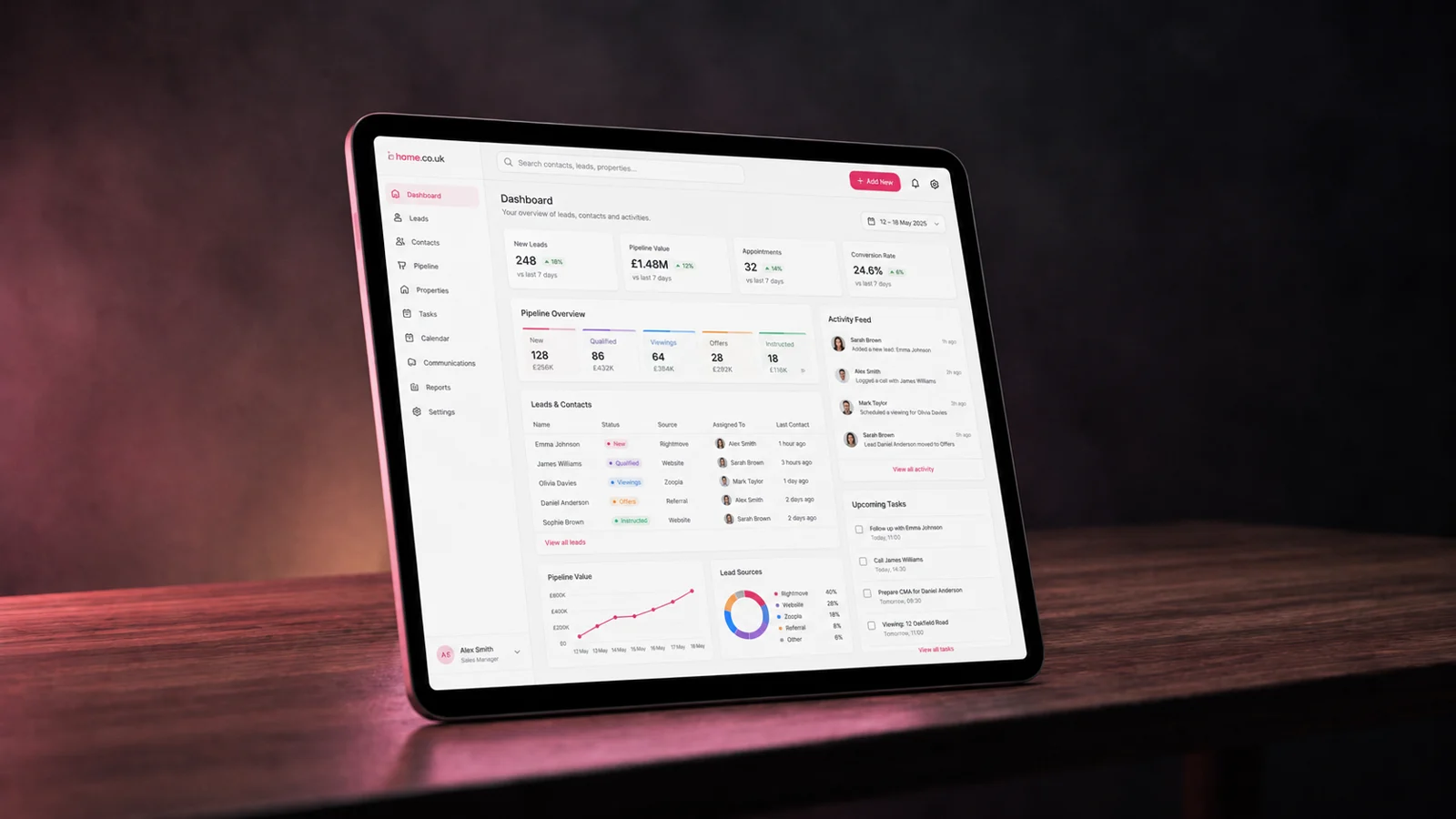
Views, not tabs — pin the ones your firm lives in
All Bookings and All Enquiries are always pinned, so the bar is never empty. The rest you pin, unpin and reorder to match how your firm actually works — and the whole pipeline is searchable by name, address or reference from the global search, on every view.
Homemove managed bookings
Your sales force. Now your admin force too.
When Homemove books a survey on your behalf, the job doesn't arrive as an email to re-type. It lands directly in your pipeline — in the Booked lane, paid, with everything a booking needs already on the record.
The customer, attached
Name and contact details on the job from the moment it lands — plus any special instructions passed on at booking.
The property and product, attached
The address and the survey type booked — so the right surveyor and the right template are obvious before anyone picks up a phone.
The payment, already cleared
The consumer paid Homemove before the job reached you. Nothing to invoice, nothing to chase — Payments shows the money side at a glance.
What's left for you
Check the slot suits your diary, carry out the survey, deliver the report — ideally written on Otto. That's the whole job.

Between appointments
A new job just landed. Already paid.
Make it yours
A fixed backbone. Your firm's language on top.
The seven pipeline phases never move — that's what keeps the board legible. Everything above them bends to how your firm actually talks about work.
Statuses your firm owns
The first time you customise, the default statuses are copied into your firm's own set. From then on: rename them, recolour them, reorder them, add new ones. Each anchors to a fixed phase so the board never loses shape — and removing a status keeps every lead's history intact.
Statuses that do things
Attach actions to any status: create a task with a due date and an assignee, or queue an email from a template — either prompted for a human check, or fully automatic. "Quote sent" can chase itself three days later without anyone remembering to.
Filters you describe, not build
Need a view the presets don't cover? Describe it in plain English — "paid enquiries over £400 I haven't contacted in a week" — and the AI filter builds it for you, ready to save and pin next to All Bookings. No query builder, no training session.
On the record
One card carries the whole job.
Open any job and the full picture is already there — and every job you run here quietly works a lever of your rate.
S. Whitmore
Illustrative job card
Pipeline phase
Anatomy of a job card
Customer, property, product, payment, assignment, correspondence — attached to one record, not scattered across a diary, a spreadsheet and three inboxes. When a question comes up months after completion, the answer is one click, not an archaeology dig.
The pipeline is lever ②
From 1 August 2026, four levers set your rate on Homemove panel work and private bookings. Running your pipeline through this CRM is lever ② — and whichever rate applies is locked the moment a job is booked. Full maths on the rate ladder.
Every lead, in context
Four things you'll never re-key again.
The rest of the operating system feeds the job record, so context arrives attached instead of copied across.

Property intel
The property behind the job — address, type and detail from Property Viewer — attaches automatically, not re-typed from an email signature.

Email threads
Every message with the client lands against the booking it belongs to, in Mail — nothing lost between a personal inbox and the job.

Documents
Terms of engagement, ID checks and the final report attach to the same record via Documents & e-sign — the paper trail follows the booking.

Payment status
Paid, pending or awaiting a slot — visible on the card, reconciled in Payments. No separate statement to cross-check on a Friday afternoon.
A pipeline day
Morning post. Kerbside confirm. Board clear by dusk.
Command-centre calm isn't a dashboard aesthetic. It's what a day feels like when nothing about a job lives only in someone's head.

Morning
The overnight enquiries, already assigned
Everything that arrived since yesterday is on the board, matched to whoever covers the product and postcode. Coffee first; nothing needs triaging.
Between jobs
A hold converts from the kerb
The client says yes; one tap turns the held slot into a booking, and the rate locks at that moment. The card glides to Booked without a phone call to the office.

Dusk
Nothing left in anyone's head
Every job is a card in a lane with its money, emails and documents attached. Lock the door. The pipeline remembers so you don't have to.
Built for the team
One pipeline, however many of you there are.
Sole trader or six surveyors and two admins — every seat is included, and the board behaves the same for all of them.
Assigned by coverage
New enquiries match to the surveyors who cover that product and postcode, with each one's availability shown — so allocation is a glance, not a group chat.
Live presence
Avatars on the lead show who else is viewing it right now — so two people never ring the same client about the same job within the same hour.
Quiet-job nudges
A card that hasn't moved for three days or more carries a "3d quiet" pill on the board — stalled work announces itself instead of hiding at the bottom of a list.
Every seat included
Surveyors and admins alike work the same board, the same views, the same records — with no per-seat charge deciding who gets to see the pipeline.
How it compares
The spreadsheet, the practice suite, or this.
Most firms run one of three systems. Only one of them knows when Homemove has already paid you.
| Capability | Bookings CRM | Spreadsheet + diary |
|---|---|---|
| Cost | Free with your listing | Free — paid for in your time |
| Homemove jobs land pre-paid | Automatic | Re-keyed by hand |
| Slot holds while clients decide | 15-min holds, auto-release | Pencil, then hope |
| Public quote links, pay from the phone | Built in | PDF attachments |
| Property record attached to the job | Automatic, by address | Another column |
| Email threads on the job record | Yes, via Mail | Separate inbox |
| Statuses your firm can rename & automate | Yes — with task & email actions | Cell colours |
| AI filters from a plain-English sentence | Yes | No |
| Counts towards your Homemove rate | Lever ② of four | No |
"Practice-management suite" describes typical paid surveyor practice software generically — features vary by vendor.
Lever ②
Running your pipeline here counts towards your rate.
From 1 August 2026 we no longer set one flat rate per firm — four levers earn your best rate on both Homemove panel work and private bookings: your live diary, your pipeline running through this CRM, reports written on our tech, and fast turnarounds. Whichever rate applies is locked in the moment a job is booked.
The Bookings CRM is lever ② — every job tracked here instead of by phone or spreadsheet moves you up the rate ladder on the Join page. Keep your diary current in Calendars & Requests and connect Payments to work all four levers from the same account.
Getting started
Your pipeline, live in three steps.
No migration project, no onboarding call, no card details. The CRM is already in your account the day your firm is verified.
Step 1
Claim your firm
Search for your firm by name or postcode — most RICS-regulated firms are already listed. Not there? Register in the same panel. The CRM activates with your verified listing.
Step 2
Invite the team
Add every surveyor and admin — seats are included. Set who covers which products and postcodes, and new enquiries will start arriving pre-assigned to the right person.
Step 3
Work the board
Enquiries, quotes, holds, bookings, reports — one lane at a time. Homemove managed bookings start landing pre-paid the moment your panel work begins, with no setup at all.
FAQ
Common questions about the Bookings CRM
Getting started & cost
Does this replace my CRM?
Yes — and it's free, built directly into your Home.co.uk account. There's nothing extra to buy, install or set up separately, so it's an easy swap for whatever spreadsheet or practice-management tool you were paying for before. Your pipeline, your diary (Calendars & Requests), your mail and your payments all live in the same account.
What does it cost?
Nothing. The Bookings CRM is part of the free Home.co.uk platform every RICS-verified firm gets — no subscription, no per-seat charge, and running your pipeline through it counts towards lever ② of the surveyor rate ladder.
Can my whole team use it?
Yes. Team seats are included, so every surveyor and admin at your firm works from the same pipeline, the same views and the same job records. Live presence avatars show you when a colleague is looking at the same lead, so two people never call the same client twice.
Is my pipeline private to my firm?
Yes. The pipeline is scoped to your firm — every job, view, status and email thread belongs to your organisation and is only visible to the seats you invite. Other firms on the platform cannot see your work.
Homemove jobs
Do I have to re-key Homemove jobs?
No. Homemove managed bookings land in your pipeline automatically, with the customer, property and payment already attached. There's nothing to type in and nothing to reconcile by hand — the job simply appears, ready to book into your diary.
What is the Homemove Bookings view?
A pinned view showing only the jobs Homemove has booked and paid on your behalf. All Bookings and All Enquiries are always pinned so the bar is never empty; Homemove Bookings and Paid Not Booked are pinned by default, and you can pin, unpin and reorder the rest — Uncontacted, Need Followup, On Hold, Refunded, Completed and more.
Does using the CRM change my rate?
Yes. From 1 August 2026, four levers set your rate on Homemove panel work and private bookings: a live diary, a pipeline running through this CRM, reports written on our tech, and fast turnarounds. The Bookings CRM is lever ②, and whichever rate applies is locked the moment a job is booked. See the rate ladder on the Join page for the full maths.
Pipeline, quotes & holds
What are the pipeline stages?
The board runs New, Contacted, Quoted, Paid, Booked, In progress and Completed — the fixed backbone every job moves along. Four parking phases sit alongside for jobs that stall: On hold, Nurturing, Lost and Unqualified. On top of those fixed phases your firm can define its own granular statuses.
Can I rename statuses or add my own?
Yes. Statuses are firm-owned: the first time you customise, the defaults are copied into your firm's own set, and from then on you can rename, recolour, reorder, add and remove them. Each status anchors to one of the fixed pipeline phases so the board stays coherent — and removing a status keeps every lead reference intact, so no history is lost.
How do slot holds work?
When a client is deciding, place a 15-minute hold on a diary slot (extendable up to 60 minutes). The slot shows as a "Held until 14:23" pill in the diary so nobody double-books it, converts to a real booking in one tap when the client confirms — or releases automatically when it expires. No pencilled-in entries that outlive the conversation.
How do quotes reach the client?
As a public quote link the client opens on their phone — no login, no account. They accept and pay from the link, and the job moves itself to Paid. Anything paid but not yet in the diary surfaces in the Paid Not Booked view, so it never sits forgotten.
Day-to-day on the board
How are new enquiries assigned?
By coverage. When an enquiry lands, the CRM matches it to the surveyors at your firm who cover that product and postcode, and shows each one's availability so it can be placed sensibly. You can always reassign by hand.
Can I search and filter the whole pipeline?
Yes. A global search finds any job by name, address or reference, and filters cover product and date on every view. You can also build an AI filter: describe the list you want in plain English — "paid enquiries over £400 I haven't contacted in a week" — and the filter builds itself, ready to save and pin.
How do I spot jobs that have gone quiet?
Any card that hasn't moved for three days or more carries a quiet-job pill showing how many days it has sat still — "3d quiet" — so stalled work is visible at a glance on the board rather than buried in a list.
The Bookings CRM works alongside the rest of the operating system — see how it fits with Calendars & Requests, Mail and Payments.
More tools
Explore the rest of the surveyor toolkit

Home Academy
Short lessons on Home tools
Learn the steps, try the real tools and follow a first-week path to your first Otto report.

Otto
AI auto-mode RICS report writer
Dictate on-site, upload photos, get a finished, fully-routed Level 2 or Level 3 report in minutes.

Level 2 Report Writer
RICS Home Survey Level 2
Field-by-field RICS Level 2 reports with inline AI suggestions, image gallery, comparables and one-click branded PDF.

Level 3 Report Writer
RICS Building Survey Level 3
Comprehensive Level 3 Building Survey reports with deep technical sections, custom rating scales and AI legal-adviser notes.

Surveyor Comparable Tool
Sold + rental comps in one click
Auto-fetch sold and rental comparables within a 1-mile radius, weighted valuation range, branded PDF appendix for any survey.
Snagging Report Builder
New-build defect tracker
Build professional new-build snagging lists with location-based defect tracking, photos, urgency, status and PDF export.

Schedule of Condition
Room by room, photo by photo
A dated record of a property's condition, every elevation and every room, dictated on site with numbered photos referenced for you and a branded PDF. No ratings, no advice.

AI Dictation
Voice-to-fields routing
Speak observations on-site; AI routes every sentence to the correct RICS field with confidence scores and replayable audio.

Image AI
Auto-categorise survey photos
Upload up to 200 photos; vision AI tags each to the right RICS element, rates condition, extracts defects and picks the best 35 for the report.
Style Profile
Your firm's writing fingerprint
Teach the AI to write like your firm — upload past reports, the AI extracts a 25-dimension writing fingerprint and applies it to every future auto-mode report.

Property Viewer
Pre-survey property intelligence
Look up any UK property and instantly see EPC, energy renovation costs, broadband coverage, environmental risks (flood, radon, mining, landfill), invasive plants, sales history and listing status — all in one dashboard.
Property Data Drawer
EPC + risks + comps in one panel
Open the property data drawer in any report to see EPC, environmental risks, listing history and comparables — copy-paste ready.

Standard Phrases
Reusable language library
Personal, firm-wide and industry-preset phrase libraries — insert with one click and use to train AI routing for voice consistency.
Required photos
Every report leaves with the photos you expect
Set the photos each Level 2 and Level 3 report must contain. Surveyors see a checklist as they write, and a report can't be issued until each photo is there or the reason is written down.

RICS Standards Check
A Home Survey Standard check before you sign
One-click AI check against the RICS Home Survey Standard — flags missing content, weak ratings and structural gaps before you sign the report.

Quote Builder
Clear choices, a date to decide
Send branded survey quotes with up to three options, a PDF and an expiry date. Reuse service templates, track responses and see your win rate.
Home Payments
Paid faster, no invoicing
Home Payments mission control — customers pay at booking through a Stripe-verified checkout, payouts land on a schedule you can see, payment links cover your private work, and there is no invoice chasing ever again.

Panel work
Every panel job, every deadline
Run jobs from the other panels you work for beside your own. List each panel with its usual fee and turnaround, add a job in under a minute, and watch every report deadline count down.

Calendars & Requests
A diary that fills itself
Per-surveyor diaries with live availability — keep your dates current and we book real jobs straight in, with inbound availability requests answered in a tap.
The firm inbox that knows the job
A full mail client scoped to your firm — @home.uk purpose mailboxes and per-user addresses, with every thread landing against the booking it belongs to.

Documents & e-sign
Signed before you set foot on site
Terms of engagement sent with the booking, tracked from sent to signed, chased automatically and stored against the job — no more chasing clients to sign.

Insurance & conflict checks
Safe to take the job
Every new job is checked against your firm's own history, so you know when you have surveyed a property before. Your PI insurance is tracked with reminders, and new reports can't be issued once recorded cover has lapsed.

Telephony
The firm number that never misses a job
A phone system built into the platform — take calls in the browser, forward to mobiles, ring the whole team at once, and keep a shared call log with optional recording.

Customer portal
Your client, never in the dark
A white-label portal under your firm's branding and domain — booking status, reminders and secure report delivery, so customers stop asking where things are.

Website builder
Built by asking, not designing
A firm website built and edited by talking to Inigo — brand and theme sync, a real section library, custom domains via CNAME, and enquiries that land in your pipeline.

Campaigns
Win the next job from the last one
Firm email campaigns with per-recipient tracking — sends, opens, clicks and read time — built on consented lists with one-click unsubscribe handled for you.

Reviews & badges
Proof that wins the next booking
Reviews earned on real completed jobs — scored by the homemover, shown on your directory profile — plus embeddable trust badges that carry the proof to your own website.

Performance
See the pipeline, beat the clock
Firm analytics without the spreadsheets — pipeline conversion, team performance and your own turnaround speed, the fourth lever of your rate.

Inigo
The AI assistant for surveyors
Ask in chat, dictate by voice, or click any element for contextual help — grounded answers on valuations, sales history and market data, inside the platform.

AI Training
Teach it your standard
Upload past reports and press Train — the AI learns your firm's defect language, ratings philosophy and phrasing, and Otto writes with it on every job.

Environmental Report
Every risk, one report
A one-click environmental risk report for any property — flood, ground stability, environmental factors and planning constraints, delivered as a PDF.
Free directory listing. Pay-as-you-go toolkit.
Every RICS-regulated surveying firm gets a verified profile, direct bookings from home.co.uk consumers and the surveyor toolkit included with the account. No subscription. No pay-per-lead. No commission on the job. Pay only when you use the premium AI tools.
2 minute setup · Verified against the RICS register · Trusted UK property platform since 1995